
How to Automate Post-Listing Paperwork Organization in Google Drive
When a listing closes, the paperwork from escrow, title, inspections, and disclosures arrives as a mix of PDFs that needs a permanent home. Here is how to set up a consistent Google Drive filing system, use ChatGPT to classify and extract key details from each document, and build a simple repeatable workflow that keeps every closed deal findable.
TAThe AMS TeamEditorial Team · September 16, 2026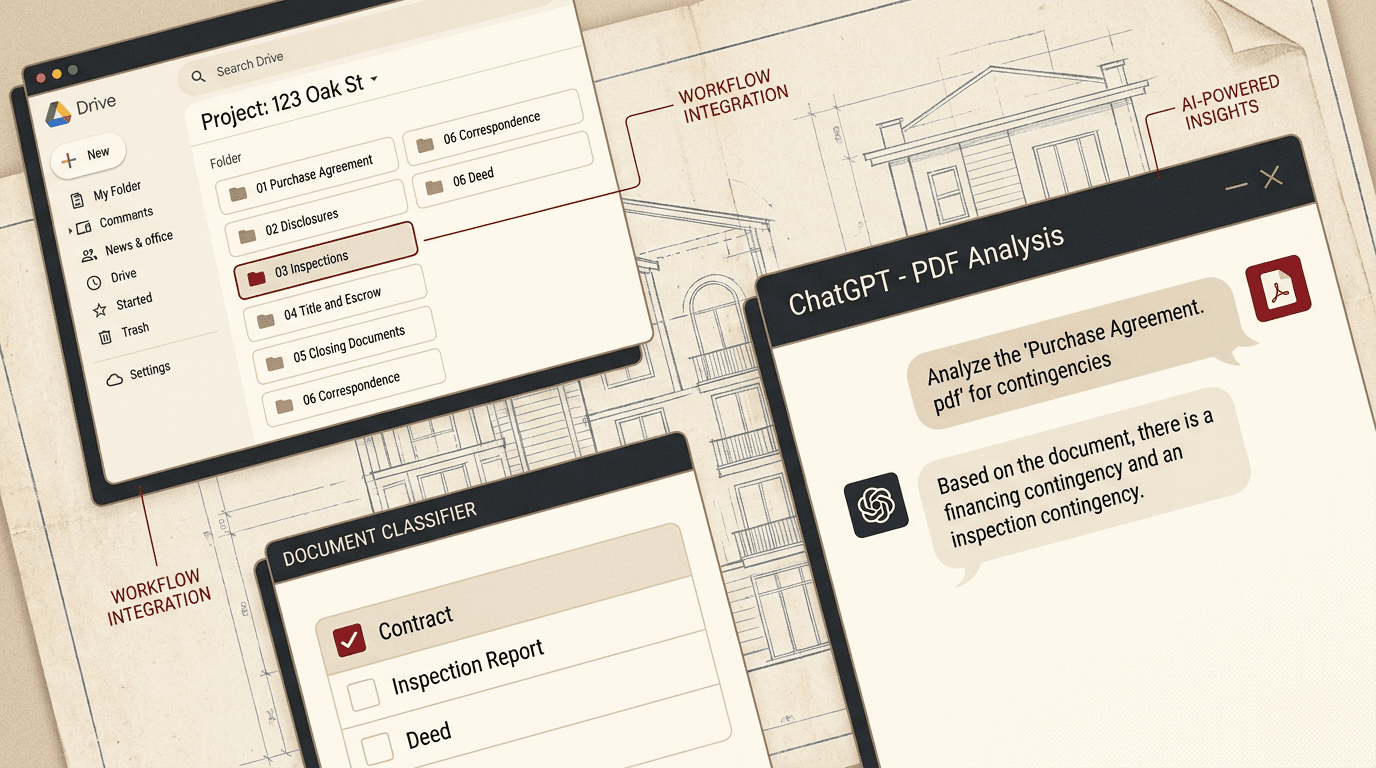
When a listing closes, the paperwork flood begins. Purchase agreements, seller disclosures, inspection reports, title policies, amendment forms, lead-based paint disclosures, and several other documents arrive from different directions and need a permanent home. Without a system, these PDFs end up scattered across email attachments, desktop folders, and downloads, making them hard to find later for taxes, future buyers, or past-client follow-up.
A consistent post-listing paperwork workflow turns that chaos into a findable archive. With a standard Google Drive folder structure and ChatGPT handling document classification and metadata extraction, the process takes minutes instead of hours.
1. Create a Standard Folder Structure
The foundation is a consistent folder template that you use for every closed deal.
Create a top-level folder called "Closed Listings" in Google Drive. Inside it, create one folder per property using the format: [Close Date] [Street Address] -- [City]. For example: "2026-09-15 123 Main St -- Springfield".
Inside each property folder, create these subfolders:
01 Purchase Agreement -- Signed contract and addenda
02 Disclosures -- Seller disclosures, lead paint, property condition
03 Inspections -- Home inspection, termite, radon, and any specialty reports
04 Title and Escrow -- Title report, settlement statement, deed
05 Closing Documents -- The final closing package and HUD/ALTA statement
06 Correspondence -- Emails and notes related to the transaction
The numbered prefixes keep folders in chronological order automatically. Once you have this template, make a copy of it in Drive as a master, then duplicate it for each new closing.
2. Use ChatGPT to Classify Each Document
When the documents arrive, you or your transaction coordinator drops each PDF into a designated "Inbox" subfolder. Then you upload them one at a time to ChatGPT with a consistent prompt.
Here is the prompt to use:
"I am organizing post-listing closing documents. Identify the document type from the list below, extract the property address and date if visible, and tell me exactly which subfolder to file it in.
Document types and their folders:
Purchase Agreement and addenda -> 01 Purchase Agreement
Seller disclosures, lead paint forms -> 02 Disclosures
Inspection reports (home, termite, radon) -> 03 Inspections
Title report, settlement statement, deed -> 04 Title and Escrow
Final closing package, HUD/ALTA -> 05 Closing Documents
Emails, notes, correspondence -> 06 Correspondence
For each document, respond with: DOCUMENT TYPE: [type] | FOLDER: [folder name] | ADDRESS: [address if found] | DATE: [date if found]"
Upload one PDF per request. ChatGPT reads the text in the PDF and gives you the classification, making it simple to drag each file into the right folder without reading every page.
3. Extract Key Details for the Property Folder Name
The property folder name needs the close date and address. Instead of typing these from memory, ask ChatGPT to extract them from one of the key documents, like the settlement statement or purchase agreement. Use this prompt:
"Extract the closing date, property address, and buyer/seller names from this closing document. Return the information as a simple list."
ChatGPT scans the document and returns the details you need to name the folder correctly. Paste them directly into the folder name format.
4. Set Up a Repeating Workflow
The goal is to make this process a standard operating procedure rather than something you remember to do after each closing.
Create a checklist in your task manager or CRM:
1. Received closing documents from escrow/title (check)
2. Copy the master folder template into Closed Listings
3. Rename the folder with date and address (from ChatGPT extraction)
4. Drop all PDFs into a temporary "00 To File" subfolder
5. Upload each PDF to ChatGPT for classification (Step 2 prompt)
6. Move each file to its classified destination folder
7. Delete the "00 To File" folder
8. Confirm the folder is complete before closing the transaction in your CRM
The full workflow takes about 15-20 minutes for a typical closing package of 8-12 documents. Your transaction coordinator or admin can handle the entire process without needing to read each document, because ChatGPT provides the classification.
5. Take It Further with Automation
Once you have the manual workflow working reliably, you can automate parts of it with tools like Zapier or n8n. A simple automation watches a designated email address or Drive folder where documents arrive, sends each new PDF to a ChatGPT API call for classification, and files it into the correct subfolder automatically.
This level of automation requires API access and a one-time setup, but it reduces the process to: forward the closing email and confirm the filing is correct. For most agents, the manual workflow in Steps 1-4 is enough to keep paperwork organized without adding technical overhead.
Build the Habit, Then Build the Archive
The first time you need to find a specific inspection report from a closed deal two years ago, the 15-minute filing investment pays for itself. A consistent post-listing paperwork system means you never scramble for a document when a past client calls or when tax season arrives.
Start with the folder template and the ChatGPT prompt. Use them on your next closing. After three or four deals, the process becomes automatic, and your Closed Listings folder becomes a reliable archive instead of a source of frustration.
Frequently asked questions
How long does it take to set up the Google Drive folder structure for post-listing paperwork?+
About 10 minutes to create the master template, then 30 seconds per closing to copy it and rename the folder with the property date and address.
Does ChatGPT work with scanned PDF documents from title companies?+
Yes, if the PDF has a text layer from a digital source. Most title and escrow companies send digital documents with extractable text. Handwritten documents on scanned paper may not extract well.
Is it safe to upload closing documents to ChatGPT?+
ChatGPT uses uploaded files only for the current conversation and does not train on business accounts. Check your brokerage policy on third-party AI tools before uploading sensitive client documents.
What if I use Dropbox or OneDrive instead of Google Drive?+
The same folder structure works in any cloud provider. The naming convention and workflow are platform-independent. Copy the template into your preferred cloud and follow the same steps.
Can my transaction coordinator handle this workflow without me?+
Yes. Give them the master folder template and the ChatGPT prompt. They handle the filing and classification, and you review the completed folder structure to confirm everything is in place.
Do I need a paid ChatGPT plan to upload PDFs?+
Yes, PDF upload and file analysis require ChatGPT Plus or a ChatGPT Team account. The free plan supports text chat only without file attachments.


