
How to Automate Real Estate Review Requests Using AI
Online reviews are one of the most powerful trust signals for real estate agents, but asking for them consistently is hard to sustain manually. Here is how to build an automated review request system using AI and automation tools that sends personalized asks, follows up at the right moments, and routes replies to the right platforms without ongoing effort.
TAThe AMS TeamEditorial Team · September 23, 2026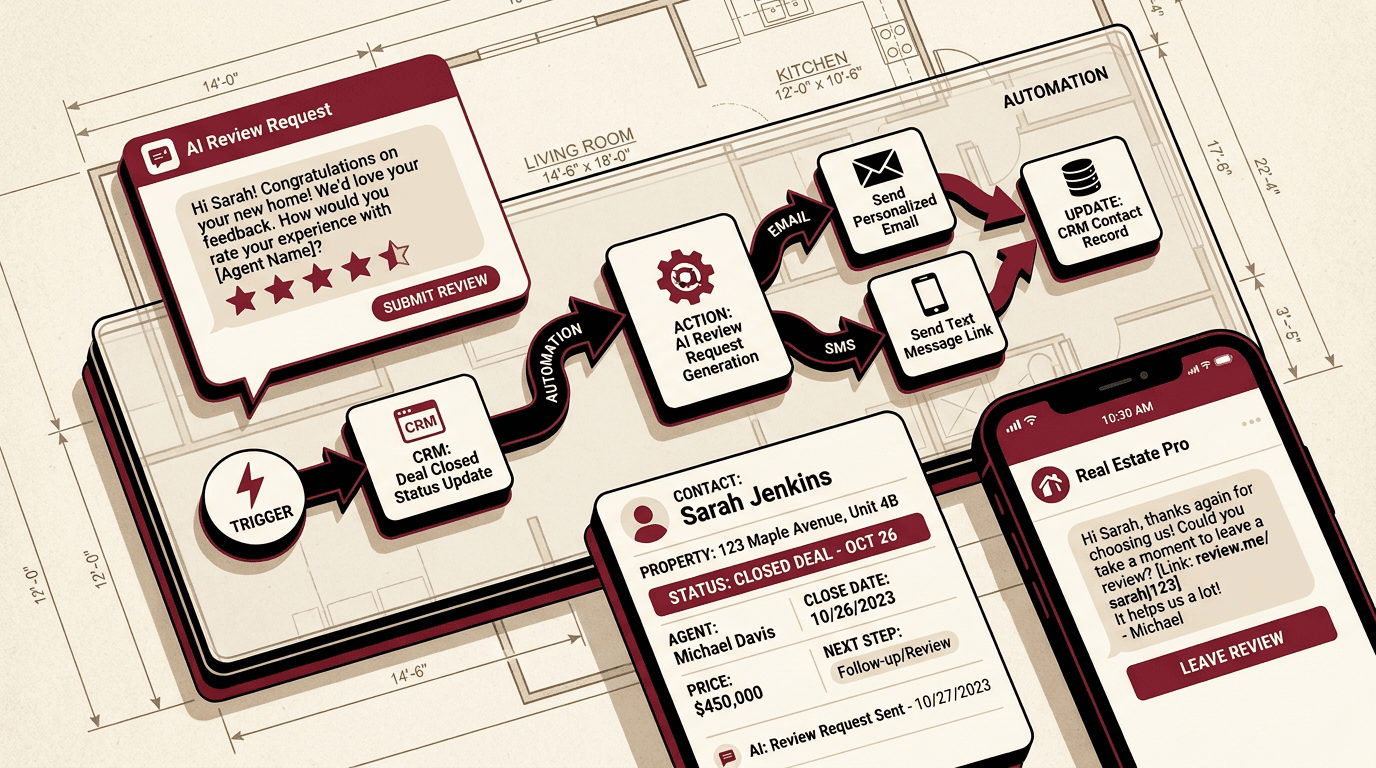
A five-star review from a happy client is one of the strongest trust signals a real estate agent can put in front of a prospective buyer or seller. But most agents ask for reviews sporadically, if at all, because manually tracking closing dates, crafting individual messages, and following up is tedious work that gets pushed aside.
This article walks through a complete automated system that uses AI to draft personalized review requests and automation tools to deliver them on a schedule. Once it is set up, the system runs by itself. Every closed deal triggers a review request sequence without you having to remember or type a thing.
1. Set Your CRM to Trigger on Closing
Automation starts with a trigger. Most real estate CRMs support workflow rules or webhook triggers when a deal stage changes. The specific trigger to set up fires when a transaction status moves to 'Closed' or 'Sold.'
In CRM platforms like kvCORE, Follow Up Boss, or LionDesk, this usually means creating a rule that watches for a deal stage change and fires a Zapier webhook. If you use KW Command, you can export closing data or use a SmartPlan action that triggers on date or activity changes.
The trigger sends three pieces of data to Zapier: the client's first name, the property address, and the closing date. That is the minimum information the AI needs to personalize the review request.
2. Create the AI Prompt for Personalized Review Drafts
The heart of this system is a ChatGPT prompt that turns transaction data into a warm, personal review request. Instead of sending a generic link, the AI drafts a message that references the specific home, the client's experience, and your working relationship.
Save this prompt as a custom GPT or a saved conversation in ChatGPT:
You are a real estate marketing assistant. I will give you a client first name, property address, and closing date. Write a short, warm email asking this client to leave a Google review about their experience buying or selling that home. The tone should be grateful and professional, not pushy. Keep it to three or four sentences. Include a link labeled [REVIEW LINK] where I can insert the actual review URL.
When ChatGPT processes this with the client's details, it produces a message that sounds authentic and specific rather than copied from a template. Store the output as a draft in Zapier.
3. Build the Zapier Automation to Send the Request
With the trigger and the draft ready, connect them in Zapier:
Trigger: Webhook by Zapier receives the client name, address, and closing date from your CRM.
Action 1: ChatGPT sends the client data through your saved prompt and returns a personalized message.
Action 2: Delay the next step by 3 days after closing. This gives the client time to settle in before you ask.
Action 3: Gmail sends the personalized message to the client's email address. Include review links for Google Business Profile, Zillow, and Facebook in the email body.
This three-action Zap runs once per closed deal. The delay ensures the message arrives at a natural moment, not the day they hand over keys.
4. Add Follow-Up Reminders
Not everyone leaves a review after one email. The system should follow up automatically for clients who do not respond.
In Zapier, add a path that checks whether the client clicked any review link in the first email. If they did, stop the sequence. If they did not, send a brief follow-up message seven days after the first one.
The follow-up should be shorter and reference the first message:
Hi [Name], I wanted to make sure my earlier note didn't get buried. If you have a moment, a quick review of your experience with the [Address] sale means a lot to my business. Here is the link again: [REVIEW LINK]. Thank you!
A two-email sequence captures most of the clients who are willing to leave a review. A third follow-up rarely improves results and can feel like spam.
5. Route Reviews to the Right Platforms
Include links to multiple platforms so clients can choose where they prefer to leave feedback. The three most valuable review locations for real estate agents are:
Google Business Profile. This is the first review source potential clients see when they search your name. Google reviews also affect local search ranking.
Zillow Agent Profile. Zillow displays agent ratings prominently on listing pages and search results. A strong Zillow review profile can generate incoming leads.
Facebook Recommendations. Facebook recommendations show up on your business page and in friends-of-friends feeds, making them visible to people who already trust the recommender.
Create short, trackable links for each platform using a URL shortener so you can measure which sources drive the most reviews. Zapier can log clicks and show you the conversion rate for each platform.
6. Handle the SMS Option
Email is the primary channel for review requests, but some clients respond better to text messages. Add an SMS branch to your Zapier automation for clients who have opted into text communication.
Use Zapier's SMS integrations (Twilio or a native SMS app) to send a shorter version of the request via text. SMS messages should be even shorter than email: two sentences and a link.
Hi [Name], thanks again for choosing me for your [Address] sale. If you have a moment, a quick review helps others feel confident working with me: [REVIEW LINK]
SMS follow-up should send only once, with no further reminders. Text messages feel more intrusive than email, so one request is enough.
7. Track and Optimize
After the system runs for a month, review the results. Zapier logs every action, so you can see how many emails were sent, how many links were clicked, and how many reviews were posted.
Key metrics to monitor:
Email open rate. If it is below 40 percent, test a different subject line or send time.
Click-through rate. If few people click review links, shorten the message or move the links higher.
Conversion rate from request to published review. This tells you the overall health of the sequence. A 15 to 25 percent conversion rate is reasonable for a two-email sequence.
Platform split. If every review comes in on one platform, consider adjusting the link order or highlighting the platforms where you have the fewest reviews.
An automated review request system turns a manual chore into a reliable pipeline. Once built and tested, it runs for months with only occasional checks. Every closed deal generates a personalized ask without you composing a single message. Over a year, that means dozens of new reviews that strengthen your reputation and help the next client find you.
Frequently asked questions
Which real estate CRMs work with this automated review request system?+
The system works with any CRM that supports webhook triggers or Zapier integration. kvCORE, Follow Up Boss, LionDesk, and Salesforce all work natively. KW Command can trigger the sequence through SmartPlans or a manual export, though it requires an extra step compared to CRMs with direct Zapier connections.
How long does it take to set up an automated review request workflow?+
Most of the setup time goes into configuring the CRM trigger and testing the Zapier connection. A straightforward implementation with ChatGPT and Zapier takes about one to two hours for someone familiar with both tools. The first time through, plan for a longer session as you test the message flow and timing.
Can I customize what the AI writes in each review request?+
Yes. The ChatGPT prompt controls the tone, length, and content of every message. You can adjust the prompt to match your voice, specify which details to include or exclude, and set the level of formality. Each request is personalized with the client name and property address from your CRM data.
What is the best timing for sending review requests after closing?+
Sending the first request three days after closing gives the client time to settle into their new home or adjust after selling. Day 3 for the first ask and day 10 for a follow-up if they do not respond is a pacing that feels natural rather than pushy.
Which review platforms should I include in the request?+
Google Business Profile, Zillow, and Facebook are the three most valuable platforms for real estate agents. Google reviews affect local search ranking and appear when someone searches your name. Zillow reviews display on your agent profile and listing pages. Facebook recommendations reach the client's social network. Include all three and let the client choose.


