
How to Set Up Automated Under-Contract Check-In Sequences Using AI
Build a structured under-contract check-in system that uses ChatGPT to draft milestone messages for your review and approval. This guide walks real estate agents through the milestones, message templates, scheduling setup, and the approval gate that keeps every send accurate and professional.
TAThe AMS TeamEditorial Team · September 18, 2026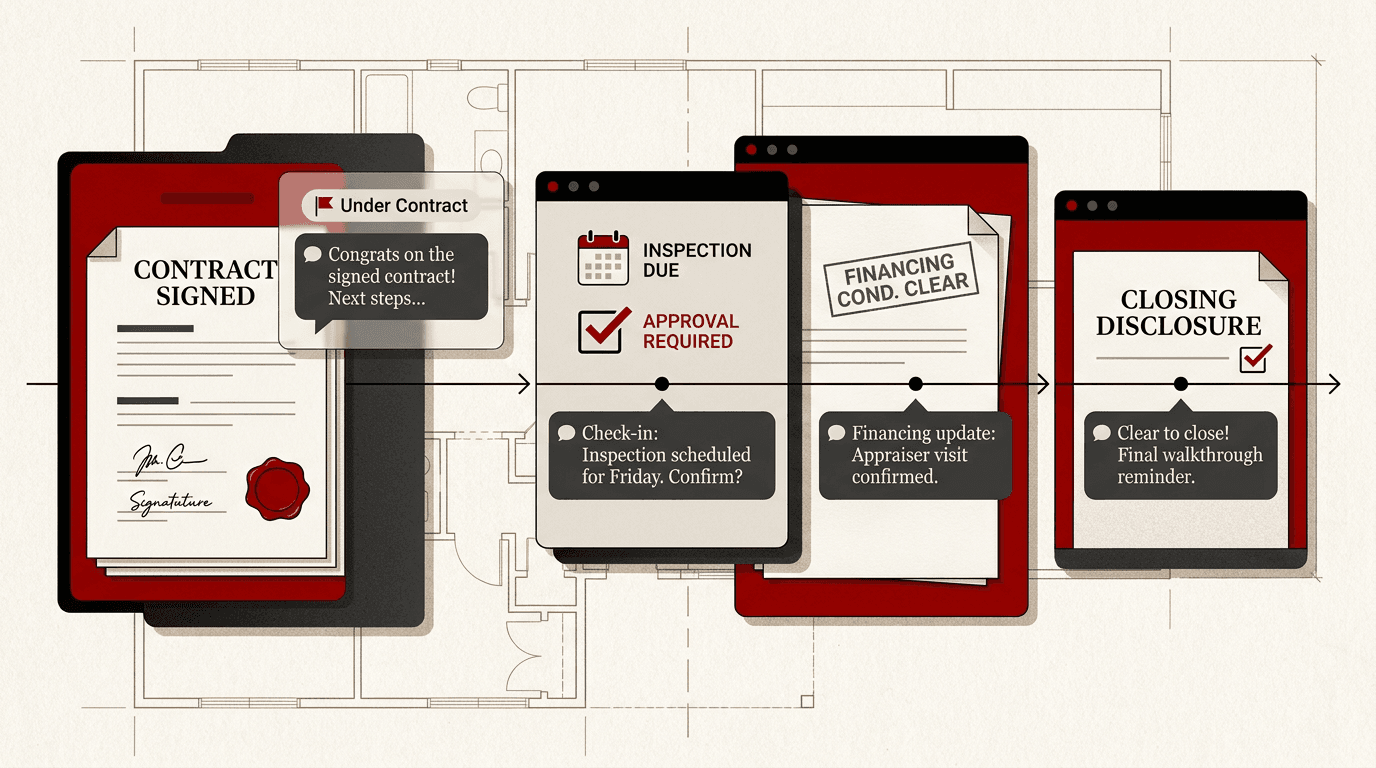
Why Under-Contract Check-Ins Matter
Once a home goes under contract, the work shifts from marketing to managing the transaction. Buyers get anxious, sellers wonder what happens next, and agents spend hours answering the same questions: Did the inspection pass? Is the financing on track? When is closing?
A structured under-contract check-in sequence answers those questions before they are asked. It keeps every client informed, reduces last-minute surprises, and protects your reputation when things get complicated.
This guide shows you how to set up an automated check-in system using ChatGPT that drafts personalized messages for each milestone, scheduled for your review and approval before anything goes out.
What You Need
The system is built on three simple pieces that most agents already have access to:
- **ChatGPT** (free or paid) to draft the message templates and personalize them for each client.
- **A scheduling tool** such as Google Calendar, your CRM task system, or Zapier to trigger reminders at the right milestones.
- **Email or text platform** where you send the actual check-in. The focus here is the drafting and scheduling system, not the delivery tool.
The key rule: you review and approve every message before it goes out. AI drafts; the agent sends.
Step 1: Define Your Under-Contract Milestones
Start by listing the standard checkpoints in a typical real estate transaction. The exact milestones depend on your market, but most contracts follow a similar sequence:
- Day 1: Contract signed. Welcome message and expectations.
- Day 3-5: Earnest money confirmed. Confirmation and what comes next.
- Day 7-10: Inspection period. Check-in on scheduled inspections.
- Day 14-17: Inspection results. Summary and next steps after the report.
- Day 18-21: Financing update. Appraisal status, loan processing.
- Day 25-30: Final walkthrough reminder. Confirm timing and details.
- Day 30-45: Closing. Final logistics, what to bring, what to expect.
Adjust the timeline to match your local contract terms. Some markets close in 30 days; others run 45 or 60. The important thing is having a clear sequence so no milestone slips.
Step 2: Build Your Drafting Prompt in ChatGPT
Create a saved custom prompt in ChatGPT that produces consistent check-in drafts. Use this prompt as your starting point:
> You are a real estate transaction coordinator. I will give you a client name, their role (buyer or seller), the current milestone, and a few notes about what happened. Draft a short check-in message (3-5 sentences) that is warm, professional, and includes one clear call to action. Do not make up specific dates, dollar amounts, or facts. Use placeholders like [inspection date] where I will fill in the real detail. End with a line that confirms the client received the message.
Keep this prompt saved as a custom GPT instruction or in a project document so you can reuse it without rewriting the context each time.
Step 3: Create a Milestone-by-Milestone Message Template Set
With the draft prompt ready, build templates for each milestone. Here are sample drafts to adapt:
Contract Signed (Welcome)
> Congratulations on your contract! Over the next few weeks, I will keep you updated at each step. Here is what happens next: [earnest money timeline], [inspection scheduling], [financing process]. Reply any time with questions.
_Review check: Is the tone warm but professional? Does it set clear expectations without promising outcomes?_
Inspection Reminder
> Your inspection is scheduled for [date]. You will receive the report within [timeframe] after the inspection. I will walk through the findings with you and discuss any requests. Let me know if anything changes before then.
_Review check: Does the message acknowledge the client's anxiety about the inspection? Is it specific enough to feel personal?_
Financing Update Request
> Your lender has [status update on the loan application]. The appraisal is [scheduled / under review]. I will follow up as soon as I have the full update. In the meantime, make sure [any documents the lender asked for] are submitted.
_Review check: Avoid making promises about timing. Use phrases like 'expected by' instead of 'will close on.'_
Closing Reminder
> We are getting close! Your closing is scheduled for [date] at [time] at [title company or attorney office]. Please bring [photo ID, funds for closing costs, any signed documents]. I will send a final reminder 24 hours before.
_Review check: Confirm all logistics are accurate. Double check the date, time, and location._
Step 4: Set Up Your Trigger Schedule
Now build the schedule that tells you when to draft each message. You can do this with:
**Option A: Manual calendar reminders.** Add each milestone as a recurring task template in your CRM or Google Calendar. When the reminder fires, run the ChatGPT prompt with the client's details and draft the message.
**Option B: Zapier automation.** Connect your CRM to a Google Sheets tracker. When a deal moves to a new stage, Zapier can add a row to the sheet and send you a notification to draft the message.
**Option C: ChatGPT Tasks (ChatGPT Pro/Plus).** ChatGPT can schedule recurring tasks if you give it a timeline. Set up a task that reminds you at each milestone to draft the next check-in.
Whichever method you choose, build a 24-hour buffer between the draft and the send. Draft the message the day before, review it in the morning, and send it by midday.
Step 5: Set Up Your Approval Gate
The approval gate is what keeps you in control. Before any message goes to a client, confirm three things:
- **Accuracy.** Are the dates, names, and property details correct? Did ChatGPT fill in a placeholder you need to replace?
- **Tone.** Does the message sound like you? Read it out loud. If it does not match your voice, change it.
- **Fair housing compliance.** Does the message imply any preference or assumption about the client's situation? Every check-in should be neutral and professional.
Keep a simple checklist document (or a note in your CRM) with these three items. Review each draft against the checklist before sending. If anything is unclear, skip the draft and send a personal message instead.
Step 6: Run the First Transaction
On your next under-contract deal, run the full sequence end to end:
- Set the milestones based on the contract timeline.
- Run the ChatGPT prompt for each milestone as it approaches.
- Review, approve, and send each message.
- After closing, ask the client: Did the check-ins feel helpful, overwhelming, or impersonal? Adjust based on real feedback.
After two or three transactions, you will know which milestones matter most to your clients and which messages need more personalization. Refine the templates and the schedule as you go.
What to Avoid
Automated check-in systems fail in predictable ways. Avoid these common problems:
- **Sending without review.** The fastest way to damage a relationship is to send a message with wrong dates, misspelled names, or missing details. Never bypass the approval gate.
- **Over-communicating.** One check-in per milestone is enough. More than one message in a stage feels pushy. If something urgent changes, call instead of sending another message.
- **Making promises the contract does not guarantee.** Do not say closing will happen on a specific date until the clear-to-close is confirmed. Use phrases like 'expected timeline' and 'pending final approval.'
- **Using the same message for every client.** A first-time buyer needs more explanation than a repeat investor. Adjust the detail level to the client.
A well-run check-in sequence builds trust. A poorly run one becomes a source of confusion. The approval gate is your safety net.
Frequently asked questions
How many check-in messages should I send during an under-contract period?+
One message per milestone is enough. A typical 30-day contract has five to seven milestones: contract signed, earnest money confirmed, inspection, financing update, final walkthrough, and closing. That is five to seven messages total. Sending more than that feels intrusive.
Can ChatGPT send the messages automatically without my review?+
ChatGPT cannot send messages on its own, and you should not set up a workflow that sends drafts without review. The approval gate is the system's most important feature. Draft with AI, review personally, send deliberately.
What if a milestone is skipped or delayed in the transaction?+
Skip the check-in for that milestone and adjust the schedule. If the inspection is waived, there is no need for an inspection-results message. Update your timeline and move to the next stage. The system should flex with the contract, not drive it.
Should I use text or email for under-contract check-ins?+
Use the channel the client prefers. Most buyers under contract prefer text for quick confirmations and email for longer updates with attachments. Ask at the contract-signing stage how they want to receive updates and use that preference throughout.
How do I handle bad news in a check-in (failed inspection, financing issues)?+
Do not deliver bad news through an automated check-in. Call the client first, then follow up with a written summary that includes the next steps. The automated sequence works best for status updates and routine confirmations, not for unexpected problems.


