
How to Use ChatGPT Vision to Analyze Property Photos and Floor Plans
Learn how to use ChatGPT Vision to analyze listing photos, read floor plans, extract room features, and compare images for seller consultations. This practical guide walks through exactly what the tool can do for real estate agents and where to verify its output.
TAThe AMS TeamEditorial Team · October 1, 2026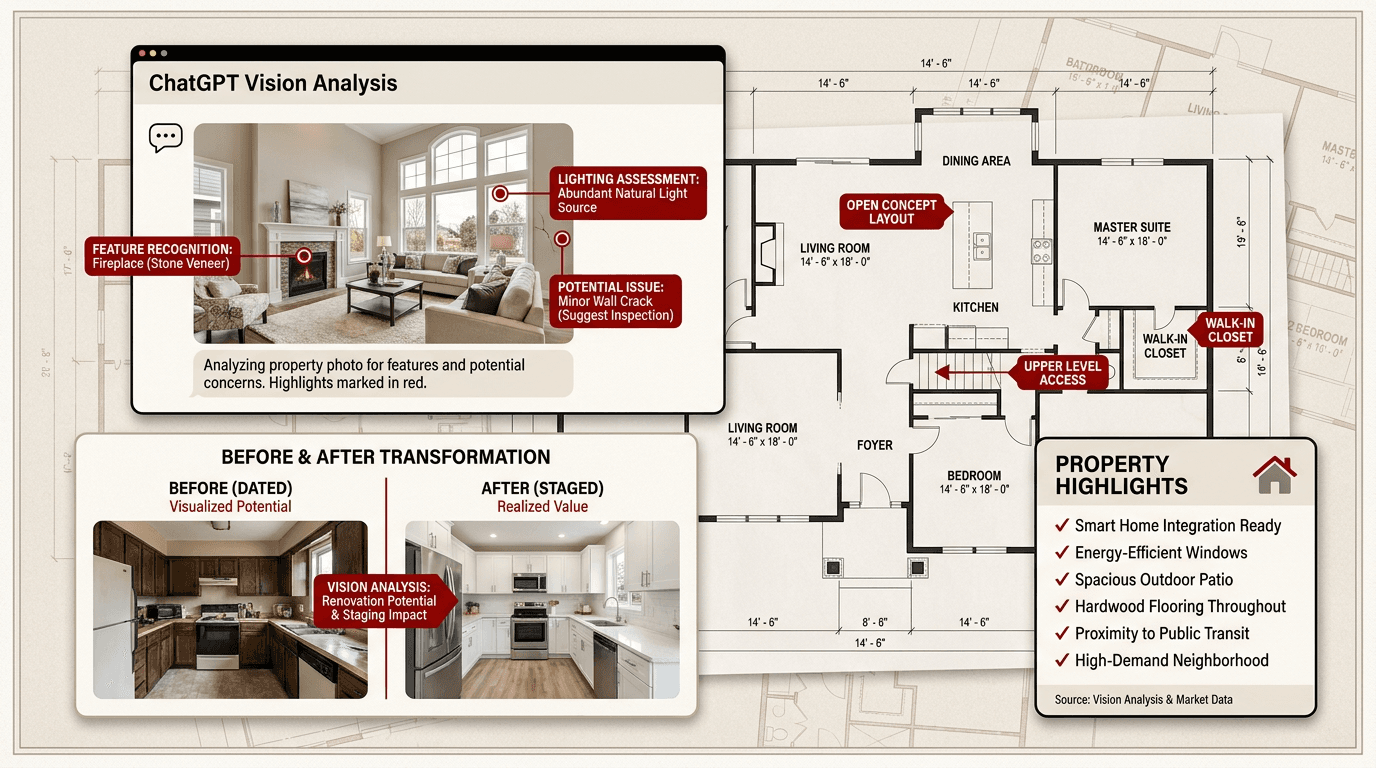
Every listing starts with photos. Before you write a description, set a price, or plan a marketing campaign, the images tell you what the property actually has. The problem is that looking at photos and floor plans is one thing. Extracting every useful detail from them is another, and that takes time a busy listing agent does not have.
ChatGPT Vision changes that. Instead of flipping through a gallery and making mental notes, you upload the photos and floor plans directly into ChatGPT and ask specific questions about what is there. The model reads the image, identifies objects, reads text, interprets layouts, and returns structured answers you can paste into your listing copy, CMA, or seller consultation.
This is a practical tool guide. You will learn how ChatGPT Vision works, what it does well with property photos and floor plans, where its limits are, and exactly how to use it in your listing workflow today.
What ChatGPT Vision Can Do with Property Images
ChatGPT Vision is available in every tier of ChatGPT. Free accounts get daily image uploads with resetting caps. Plus at $20/month raises those caps substantially, and Pro at $200/month is effectively uncapped. You upload your image the same way you attach a file to any message, by clicking the paperclip icon or pasting from clipboard.
For real estate uses, here is what it handles reliably:
Room type and feature identification. Upload a living room photo and ask what features are visible. ChatGPT identifies the fireplace, the flooring type, light fixtures, ceiling height indicators, window count, and built-in shelving. It can spot the difference between hardwood and laminate from a clear photo.
Text extraction from documents and flyers. A photographed listing brochure, a tax card, or a property disclosure PDF screenshot uploads and converts to structured text. You can ask for every number in a table or extract the HOA rules section.
Floor plan interpretation. Upload a floor plan image and ask what rooms are present, how they connect, how many doors and windows are shown, and what the overall layout logic is. Independent tests have shown that ChatGPT consistently identifies room types and general layout patterns from floor plans, making it useful for extracting information from a plan you received as a PDF screenshot.
Before and after comparison. Upload two photos of the same room and ask ChatGPT to list every difference it spots. This is useful for showing a seller what a staged version of their room would look like or for documenting renovation progress.
Chart and data extraction from listing presentation slides, market reports, or price comparison charts. If you receive a market snapshot as an image, ChatGPT can read the axis labels, identify trends, and rebuild the chart data as a table you can paste into a spreadsheet.
How to Upload Property Photos into ChatGPT
The process is the same on desktop and mobile.
On the web, click the paperclip icon to the left of the message bar, select your image, and type your question in the same message. On iOS and Android, tap the plus or photo icon, pick an image from your library or shoot one with the camera, then add your question.
Supported formats are PNG, JPEG, WebP, and single-frame non-animated GIF. The per-image size limit is about 20 MB according to the OpenAI vision API documentation. PNG is best for screenshots and floor plans because text stays crisp. JPEG is fine for real estate photos taken with a phone camera.
You can attach up to five images in a single message. This is useful for comparing two photos side by side or uploading several rooms from the same listing at once.
Your uploaded image stays in the conversation context for follow-up questions. You can ask several rounds of questions about the same photo without re-uploading it.
Extracting Room Features from Listing Photos
Upload a listing photo and ask ChatGPT what it sees. The model identifies:
Room type: kitchen, living room, primary bedroom, bathroom, home office, dining room. It reads visual cues like counters, cabinets, beds, and fixtures.
Flooring: hardwood, tile, carpet, laminate, vinyl, or concrete. Clear photos with visible flooring let the model distinguish finishes.
Lighting and fixtures: ceiling fans, recessed lights, pendant fixtures, chandeliers, track lighting, and natural light sources.
Counter and cabinet materials in kitchens: granite, quartz, marble, butcher block, laminate, and the cabinet door style.
Special features: fireplaces (gas, wood, or electric), built-in shelving, window treatments, vaulted ceilings, exposed beams, and smart home devices visible in the photo.
Example prompt: 'I am a real estate agent. Uploaded is a photo of the kitchen in a listing I am preparing. List every feature visible in this image, organized by category: countertops, cabinets, appliances, flooring, lighting, and special features. Use the exact terms a buyer would search for.'
The structured output can go directly into your MLS listing description, a listing presentation for the seller, or a social media post highlighting the kitchen.
Reading and Analyzing Floor Plans
Floor plans are harder for AI models than regular photos, but ChatGPT handles them well enough to be useful. Independent testing by architects and AI researchers has confirmed that modern multimodal models like GPT-5 can identify walls, doors, windows, stairs, room labels, and the general spatial organization of a floor plan.
Here is what to expect when uploading a floor plan:
Room identification is reliable for standard residential plans. ChatGPT identifies living areas, bedrooms, bathrooms, kitchens, garages, and utility spaces from labeled or unlabeled plans.
Door and window counts are good but not perfect. In controlled tests, ChatGPT and Claude matched exact door counts on most floor plan versions, with slight undercounts on windows. Do not trust the count for commission-critical numbers without verifying against the plan directly.
Layout logic is where ChatGPT excels. It can describe the circulation pattern (central hall, open plan, split bedrooms), identify which spaces are public versus private, and explain the relationship between rooms.
Example prompt: 'I am a real estate agent preparing a listing for a home. Attached is the floor plan. Identify every room on the ground floor, count the doors and windows, describe how rooms connect, and note any unusual features or design elements a buyer would ask about.'
For the best results, upload a clean scanned or exported floor plan as a PNG. Avoid photos of paper plans taken at an angle or in low light, because the model will struggle with warped perspective.
Comparing Multiple Images for Seller Consultations
Upload two or more images in a single message and ask ChatGPT to compare them. This is useful for:
Preparing a competitive market analysis. Upload comparable sold property photos alongside your listing and ask ChatGPT to list feature differences.
Showing renovation potential. Upload the current kitchen and a staged or renovated version, and ask for a detailed list of what changed.
Preparing a listing presentation. Upload the main exterior shot, the best interior photo, and the floor plan, then ask ChatGPT to summarize the property's top selling points based on all three.
Example prompt with multiple images: 'I am including three images from a listing I am preparing to present to a seller: the exterior, the kitchen, and the floor plan. Based on all three together, list the top five selling points and the top three items I should address before listing photos.'
Limitations You Need to Know
ChatGPT Vision is useful but not perfect. You should know where it falls short before you rely on it in front of a client.
Spatial reasoning is approximate. The model cannot measure dimensions from a photo or floor plan. It estimates but does not measure. If a floor plan lacks measurement callouts, ChatGPT's dimension readings are unreliable. Always verify square footage against the actual floor plan or tax record.
Counting is approximate, not exact. ChatGPT's object counts for windows, doors, and light fixtures are estimates, especially in large or complex spaces. Check them against the real property or original floor plan.
Text in images needs good resolution. Blurry photos, angled documents, faded receipts, and handwritten notes reduce accuracy. The model handles clean printed text well but struggles with bad image quality.
Panoramic and fisheye images perform poorly. The model does not handle wide-angle distortion well. Use standard perspective photos for best results.
The model does not perform facial recognition or identify specific people. It can describe what someone is wearing or doing in a photo, but it cannot tell you who they are.
Rotated or upside-down images reduce accuracy. Make sure your photos are oriented correctly before uploading, especially for floor plans that contain directional text.
Putting It Together: A Full Listing Photo Workflow
Here is a repeatable workflow you can run for every new listing:
Step 1: Gather your images. Collect the best exterior shot, one photo of each room type, and the floor plan. Use clear, well-lit photos taken with a phone or professional camera.
Step 2: Start a ChatGPT conversation and label it with the property address. This keeps the analysis together and lets you ask follow-ups later without losing context.
Step 3: Upload the floor plan first. Ask for room types, door and window counts, and layout notes. Save the output. The floor plan analysis establishes the structure of the property.
Step 4: Upload each room photo one at a time or in groups of two to three. Ask for feature extraction organized by category. Save the output per room.
Step 5: Ask ChatGPT to combine everything into a single property overview. Prompt: 'Based on all the images we have discussed in this conversation, write a property overview with room-by-room feature highlights, selling points, and items to address. Use the exact language appropriate for an MLS listing.'
Step 6: Review the output. Correct any errors, verify counts and dimensions against the original images, and paste the cleaned version into your listing workflow.
Frequently asked questions
Can ChatGPT measure room dimensions from a photo?+
No. ChatGPT cannot measure dimensions from photos or floor plans. It estimates based on visual proportions, but those estimates are approximate and not reliable for listings. Always verify square footage against the actual floor plan or tax record. The model can read dimensions that are already printed on a floor plan but cannot measure a room from a photo alone.
What image format works best for uploading floor plans to ChatGPT?+
PNG is the best format for floor plans because text, lines, and boundaries stay crisp without compression artifacts. Upload a clean scan or exported digital version. Avoid photos of paper plans taken at an angle or in low light, because the model struggles with warped perspective and shadows over text.
How many property photos can I upload to ChatGPT at once?+
You can upload up to five images in a single message. This is useful for comparing a before and after shot, uploading several rooms at once, or combining an exterior, interior, and floor plan in one request. Each image stays in the conversation context for follow-up questions, so you do not need to re-upload for additional questions about the same photo.
Is ChatGPT Vision available on the free tier of ChatGPT?+
Yes. Free accounts can upload and analyze images with daily caps that reset on a rolling window. Plus ($20/month) offers substantially higher caps, and Pro ($200/month) is near-unlimited. Image analysis is built into the default model and does not require any special setting or toggle. The same PNG, JPEG, WebP, and non-animated GIF formats work on all tiers.
Can ChatGPT read text from photographed real estate documents?+
Yes, and it is one of the strongest things ChatGPT Vision does. The model transcribes printed text from invoices, property disclosures, brochures, tax cards, and other documents. It handles multi-column layouts, tables, and mixed fonts better than older OCR tools because it understands structure, not just characters. Verify numbers on anything financial because a single misread digit changes the meaning.
Should I trust ChatGPT's count of windows and doors from a floor plan?+
Count the results as estimates, not exact numbers. Independent tests show that ChatGPT matches exact door counts on most clear floor plans but may slightly undercount windows. For commission-critical details like the number of bedrooms or bathroom fixtures, verify against the original floor plan directly. The model is better at describing layout logic and room relationships than at precise counting.
What types of images does ChatGPT Vision handle poorly?+
ChatGPT Vision struggles with panoramic and fisheye images due to distortion. Blurry photos, low-resolution images, faded or thermal-printed documents, and handwritten notes reduce text extraction accuracy. Rotated or upside-down images also perform poorly. The model does not do facial recognition or identify specific people. For best results, use clear, well-lit, correctly oriented standard perspective photos.


