
How to Build a Claude Lead Response Assistant for Real Estate Agents
Build a Claude lead response assistant that sorts a new real estate inquiry, identifies missing facts, and prepares a reply for your approval. This guide gives agents a reusable prompt, a review checklist, and guardrails for fair housing, privacy, and accurate follow-up.
TAThe AMS TeamEditorial Team · August 30, 2026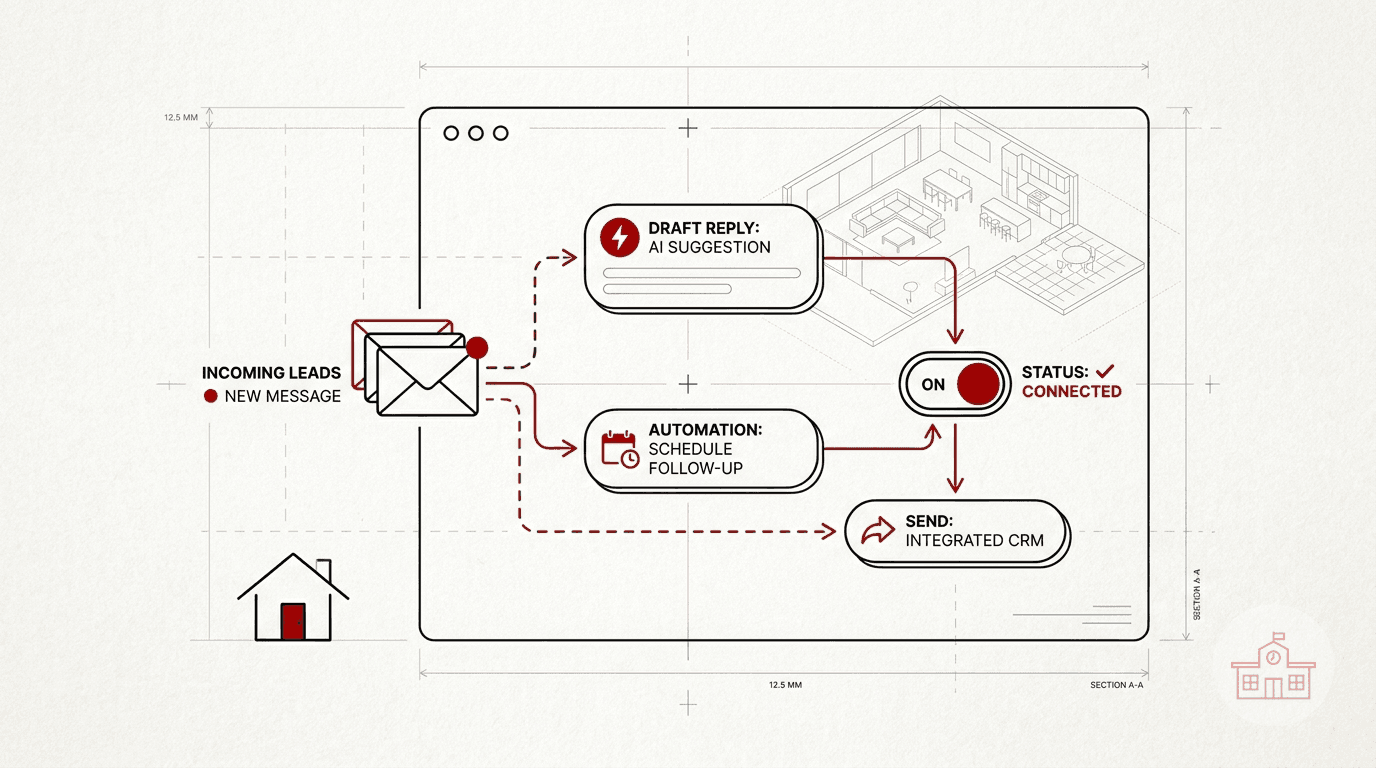
A new lead rarely asks a perfectly organized question. One person wants a showing but leaves out the property address. Another asks about financing, a neighborhood, or the value of a home. The useful first response is not a long sales pitch. It is a prompt, accurate reply that answers what you know, asks for the missing detail, and gives the person a clear next step.
Claude can help prepare that reply, but it should not decide facts or send a message without review. The setup below creates a repeatable first-question triage workflow inside Claude. You paste the inquiry and a small fact packet, Claude classifies the request, lists what is missing, and drafts a response. You remain responsible for checking and sending it.
What this assistant should do
Give the assistant a narrow job. Its output should include:
- The lead's likely request type.
- The facts supplied by the lead.
- The missing facts needed for a useful reply.
- Any statement that needs verification.
- A short draft response.
- A final approval status that always says human review is required.
Useful request types include property information, showing request, buying process, financing question, selling consultation, home value question, existing client update, and other. These labels help you scan the response. They do not determine who deserves service or how someone should be treated.
Step 1: Write your response rules
Before opening Claude, decide what the assistant may and may not do. A practical rule set is:
- Use only facts supplied in the inquiry or the agent fact packet.
- Never invent availability, price, property condition, school information, commute time, financing terms, legal conclusions, or market results.
- Mark unsupported details as VERIFY.
- Do not infer a person's identity, finances, preferences, family situation, or protected characteristics.
- Do not describe a neighborhood as safe, family-friendly, exclusive, or suited to a type of person.
- Ask no more than two necessary follow-up questions in the first reply.
- Keep the draft concise and conversational.
- Never claim that a showing, appointment, or service is confirmed unless the fact packet says it is confirmed.
- End every output with HUMAN REVIEW REQUIRED.
HUD states that the Fair Housing Act prohibits housing discrimination because of race, color, national origin, religion, sex, familial status, and disability. Your brokerage and local rules may add requirements. The safest role for Claude here is drafting from approved facts, not deciding how to respond based on personal characteristics.
Step 2: Create a small fact packet
A good reply depends on context. Anthropic's prompting guidance recommends clear, direct instructions and enough context for the task. Keep that context current and limited to what the response needs.
Use a fact packet like this:
AGENT FACTS
Agent name: [name]
Brokerage: [brokerage]
Service area: [cities or areas you actually serve]
Scheduling link: [approved URL or NONE]
Office phone: [approved number]
Normal response window: [your real policy]
Required brokerage language: [approved text or NONE]
INQUIRY FACTS
Channel: [email, text, website form, or portal]
Received: [date and time]
Lead message: [paste the message]
Known property address or MLS number: [value or UNKNOWN]
Known relationship or consent notes: [value or NONE]
Facts already verified: [list]
Do not paste identity documents, bank records, full financial files, access codes, or information that is not needed for the draft. Check the data terms for the Claude plan your business uses. Anthropic says inputs and outputs from its commercial products are not used to train models by default, while separate terms apply to consumer products.
Step 3: Paste the master prompt into Claude
Open a new Claude conversation and paste this prompt. Replace the bracketed text with your rules and fact packet.
You are a first-question triage and reply-drafting assistant for a real estate agent.
Your job is to organize the inquiry and prepare a draft for human approval. You do not send messages, confirm appointments, make promises, provide legal or financial advice, or invent facts.
Follow these rules:
1. Use only the inquiry and fact packet.
2. If a required detail is missing, write UNKNOWN.
3. Mark every unsupported claim as VERIFY.
4. Do not infer protected characteristics or tailor service based on them.
5. Do not characterize neighborhood safety, schools, residents, or who belongs in an area.
6. Ask no more than two necessary follow-up questions.
7. Keep the reply under 140 words unless the inquiry requires a factual explanation.
8. End with HUMAN REVIEW REQUIRED.
Return exactly these sections:
REQUEST TYPE
KNOWN FACTS
MISSING FACTS
VERIFY BEFORE SENDING
DRAFT REPLY
APPROVAL STATUS
AGENT FACTS
[paste approved agent facts]
INQUIRY
[paste the inquiry facts and original message]
The fixed headings make the output easier to review. Anthropic also recommends examples when you need consistent tone or structure. After the basic prompt works, add two examples drawn from fictional inquiries, not real client records. Show one complete inquiry and one inquiry with missing information.
Step 4: Test the assistant before using it with a lead
Run several fictional scenarios. Include easy and difficult cases:
- A showing request with no property address.
- A buyer asking whether a property is still available.
- A seller asking for a home value estimate with no address.
- A message asking whether a neighborhood is safe or good for families.
- A financing question that should be referred to an appropriate licensed professional.
- An existing client asking whether an appointment is confirmed.
For each test, check whether Claude stays within the supplied facts, flags missing details, avoids steering language, and leaves confirmation to the agent. Revise the prompt when a test fails. Do not fix one draft and assume the workflow is fixed. Change the instruction that allowed the error, then rerun the test.
Step 5: Use a send-review checklist
Read every proposed reply before it leaves your inbox or phone. Confirm:
- Names, property addresses, dates, times, prices, and links are correct.
- The reply does not promise availability or an appointment that is not confirmed.
- Any VERIFY item has been checked or removed.
- The wording follows fair housing, advertising, brokerage, MLS, and local requirements.
- The message asks only for information needed for the next step.
- The channel and recipient are correct.
- The tone sounds like you.
If the reply becomes a commercial marketing email rather than a direct response to an inquiry, review the FTC's CAN-SPAM requirements. The FTC explains that the law covers commercial email, not only bulk messages, and distinguishes commercial content from transactional or relationship content. This article is a workflow guide, not legal advice.
Step 6: Add automation only after the manual workflow is reliable
Start with copy, paste, review, and send. That exposes weak instructions without risking an automatic message. Once the manual process is dependable, a separate automation can place an incoming inquiry into a draft queue. Keep the final send behind an approval step, restrict access to client data, preserve the original inquiry, and log who approved the response.
This article does not connect Claude to an inbox or CRM, and Claude alone does not create that external automation. If you later connect systems, document exactly which tool receives the data, which fields it stores, and what action requires human approval.
Keep the first response focused
The assistant is successful when it helps you prepare a correct next message, not when it produces the longest answer. A concise draft that answers one question and asks for one missing detail is easier to verify. Keep the original inquiry beside the draft, check every fact, and send only after you approve the final wording.
Primary sources
- Anthropic, Prompting best practices
- Anthropic Privacy Center, Is my data used for model training?
- U.S. Department of Housing and Urban Development, Housing Discrimination Under the Fair Housing Act
- Federal Trade Commission, CAN-SPAM Act: A Compliance Guide for Business
Related articles
Frequently asked questions
Can Claude send a real estate lead response automatically?+
Not in the workflow described here. Claude prepares a draft, and the agent checks the facts, compliance, recipient, and next step before sending. An external inbox or automation connection would require separate setup and controls.
What information should I give Claude about a new lead?+
Provide the original inquiry and only the approved facts needed to answer it, such as the property address, your service area, a verified scheduling link, and known availability. Do not paste access credentials, identity documents, full financial files, or unrelated personal information.
How do I stop Claude from inventing listing details?+
Tell Claude to use only the supplied fact packet, write UNKNOWN for missing information, and mark unsupported statements as VERIFY. Then test the prompt with incomplete fictional inquiries and review every real draft before sending.
Should a Claude lead assistant answer neighborhood or financing questions?+
It can draft a neutral response using verified information, but it should not characterize who lives in a neighborhood, infer protected characteristics, guarantee an outcome, or provide unqualified legal or financial advice. Route questions to appropriate sources or licensed professionals when needed.
Why keep human approval before sending?+
Human approval lets the agent verify current property facts, apply brokerage and local requirements, catch inappropriate language, and confirm the correct recipient and channel. The original inquiry and the proposed draft should remain visible during that review.


