Steps to Get Your TREC Links from HAR
1. Login to HAR at your member portal
TAThe AMS TeamEditorial Team · January 14, 2026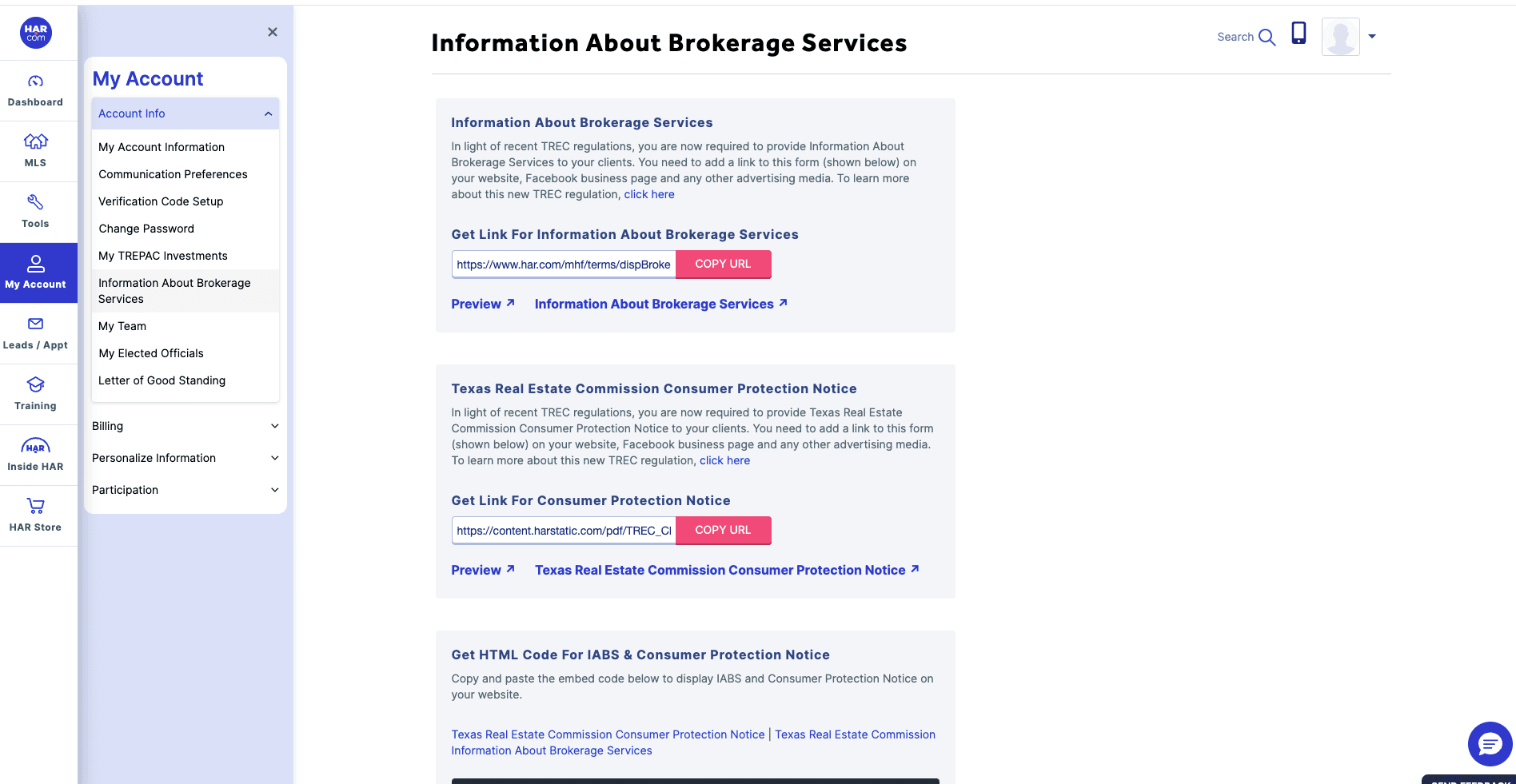
Steps to Get Your TREC Links from HAR:
1. Login to HAR at your member portal
2. Click on My Account
3. Click on Account Info
4. Then click on Information About Brokerage Services
5. Copy URL for the Information About Brokerage Services
6. Copy URL for the Consumer Protection Notice
Link to find your TREC links. Use these links on your social media, website and linktree.
https://www.har.com/moa_myaccount_membership_info/information_about_brokerage_services
Frequently asked questions
Which TREC links do I need from HAR?+
Two URLs from your HAR account: the Information About Brokerage Services link and the Consumer Protection Notice link.
How do I find my TREC links in HAR?+
Log in to your HAR member portal, click My Account, click Account Info, then click Information About Brokerage Services. Copy the URL for Information About Brokerage Services and the URL for the Consumer Protection Notice.
Where should I put my TREC links?+
Add them to your social media profiles, your website, and your Linktree.